 Games
About this tool
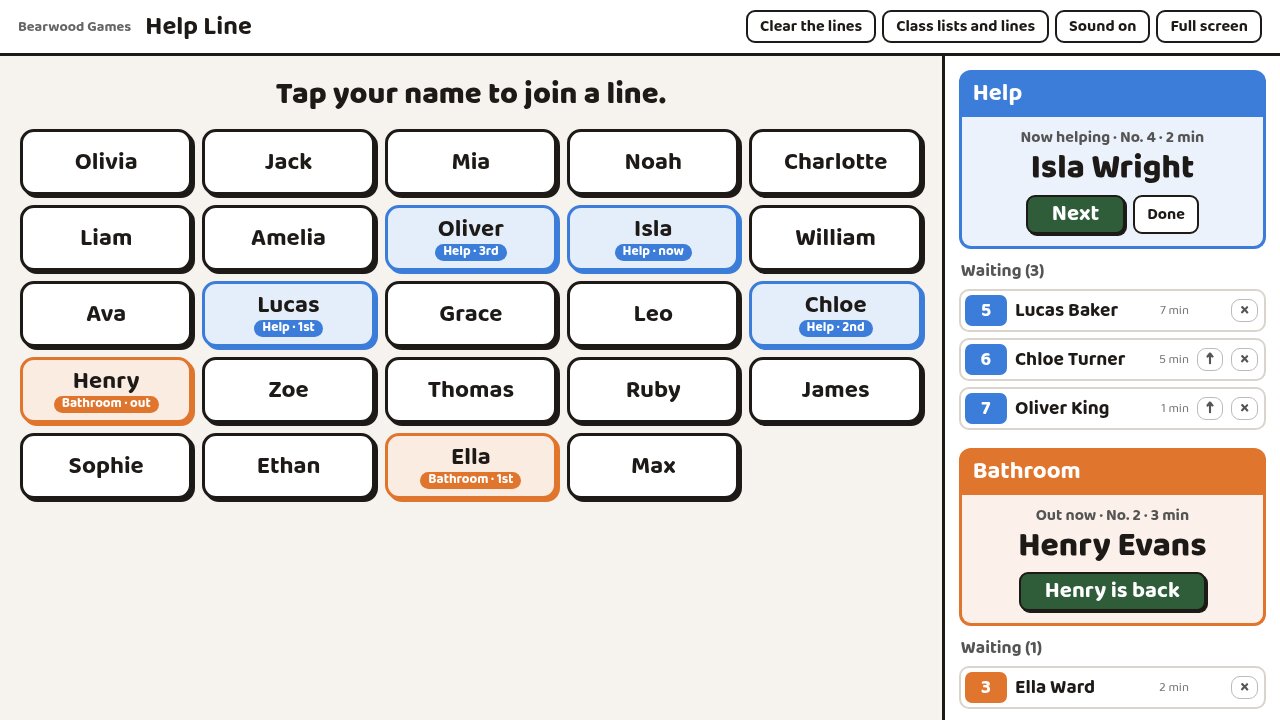
It works like the ticket counter at a deli. Put the page on the board, or on a tablet next to your desk. Every child's name is on a big button. A child who needs help taps their name and gets a number. They can see how many children are before them and go back to their work while they wait.
When you're ready for the next child, press Next (or the N key). Their name fills the screen with "It's your turn" and a short chime. Their button and the list beside the names show who is being helped and who is waiting, and for how long.
If someone sorts it out themselves, they tap their name again and leave the line. You can also take a child out of the line or move them to the front.
A second line
Turn on a second line for the bathroom, or anything else you name it. It lets one child out at a time. When the child who is out comes back and taps "is back", the next one in that line is called. A child can only be in one line at a time.
Class lists
Paste a class list straight from a spreadsheet or your roll. "Smith, Anna" becomes Anna Smith, and numbers and email addresses are left out. Buttons show first names, with a last initial when two children share one. If you already use our Seating Chart in the same browser, you can copy its classes in with one button.
Names are kept in the browser on that computer. They aren't sent to us.
Good for
- Independent work time, when lots of hands go up at once
- Small-group lessons, so the rest of the class knows when it's their turn
- Keeping track of who is out of the room
- Children who wait a long time with a hand up